B2B geolocation helps companies use territory as a strategic segmentation signal, not just as a location filter. By combining geographic data with industry, company profile and campaign performance, Bancomail and MailSenpai make it easier to build targeted B2B email campaigns across the UK, the US and other priority markets.
B2B Geolocation: what it is, what it is for and how to turn it into automated email campaigns
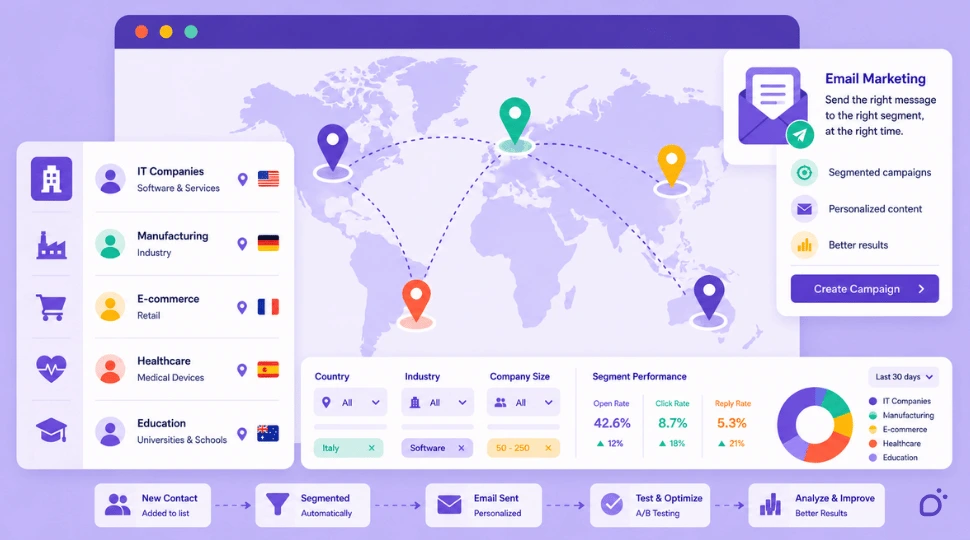
TL;DR: B2B geolocation is not just about finding companies in a specific area. It turns territory into a segmentation, sales priority and performance analysis criterion. Starting from Bancomail B2B databases, geolocated segments can be activated in MailSenpai through lists, tags, sequences and automated tests. The result is a campaign aligned with the real market, not simply a “local” campaign.
What B2B geolocation means
B2B geolocation is the use of company geographic data to build commercial segments, analyse territorial markets and activate more targeted email marketing campaigns.
In a B2B context, geolocating a company does not only mean knowing where it is physically based. It means selecting prospects by territorial criteria such as country, region, county, state, city, postcode or ZIP code, and combining that information with commercial variables: industry, category, company size, online presence, technologies used or other useful segmentation attributes.
A campaign aimed at manufacturing companies in the Midlands, SaaS companies in California or hotels in Scotland does not start from a category alone. It starts from the intersection between what the company does and where it operates.
This is where B2B geolocation becomes strategic: not just a search filter, but a way to read the market and decide how to activate it.
Why B2B geolocation is a strategic signal
In B2B, geography is a market signal.
Territory can reveal operational information: sales coverage, logistics proximity, language, market maturity, industry density, local networks or expansion priorities.
For this reason, “where” does not only answer the question:
- Which companies can I contact?
It also answers more useful campaign questions:
- Which area should I start from?
- Which territory responds better?
- Where is the message more relevant?
- Which markets deserve a second campaign?
Used this way, B2B geolocation becomes a criterion for deciding priorities, content, timing and performance interpretation.
What a geolocated B2B database is used for
A geolocated B2B database helps companies identify businesses located in specific areas and combine this information with other segmentation criteria.
It is useful when a company wants to:
- sell in a specific region, county, state or city;
- open a new local market;
- work only in areas covered by its sales network;
- differentiate campaigns by country or language;
- select companies in high-density industry clusters;
- build campaigns linked to trade fairs, events or territorial initiatives;
- compare the response of different markets;
- plan progressive expansion.
In B2B, however, geographic data is effective only when it is structured and combinable with commercial criteria.
“Companies in Manchester” is not enough. “Companies in a specific sector in Greater Manchester” is more useful.
“Contacts in the United States” is not enough. “US prospects in a specific business category” is more useful.
The value comes from the intersection between geography and company characteristics.
The role of Bancomail in B2B geolocation
Bancomail allows companies to build B2B selections by combining geographic area with industry and company criteria.
A selection can start from country, region, county, state, city, postcode or ZIP code, but it becomes truly useful when associated with elements such as category, sector, business type, e-commerce presence, company information and contact data that can be used for B2B campaigns.
In this scenario, Bancomail is the data starting point: it helps transform a generic target idea into a concrete segment ready to be activated.
For example:
- dental practices in London;
- hotels in Scotland;
- manufacturing companies in the United States;
- e-commerce businesses in California;
- restaurants in a specific county;
- software houses in selected UK or US cities.
These selections make campaigns more precise because the target is not defined only by activity, but also by territorial context. When the geographic component is central, email databases by country help structure market selection before moving into campaign execution.
From geolocated database to email campaign
Once the segment has been created, the next step is activation.
If Bancomail represents the data layer, MailSenpai represents the operational layer: import, list management, sending, automation, follow-up and performance analysis.
A segment built in Bancomail can become in MailSenpai:
- a dedicated list;
- a contact group;
- a territorial tag;
- a specific campaign;
- an automated sequence;
- a cluster to compare with other territories.
In this way, B2B geolocation enters the entire campaign cycle: before sending, to select the target; during sending, to organise or personalise communication; after sending, to read performance by area.
How to use geolocation in B2B email marketing
Segment campaigns by territory
The first use case is to create different campaigns for different areas.
A company can work with separate lists for London, Manchester, Scotland, California, Texas or the wider US market, avoiding overly broad campaigns and observing the behaviour of individual markets more clearly.
Define sales priorities
It does not always make sense to activate the entire available database immediately.
B2B geolocation allows teams to proceed in phases:
- priority area;
- pilot campaign;
- result analysis;
- extension to similar areas;
- new campaign on secondary markets.
This approach is useful when testing an offer, opening a new sales territory or understanding which markets respond better.
Personalise the message
Geographic personalisation should not be reduced to inserting the name of a city in the email subject line.
The real value is using territory to make the message more credible: served area, language, local network, territorial use cases, industry events, logistics availability or commercial coverage.
The message does not necessarily need to sound explicitly “local”. It must, however, feel coherent with the recipient’s context.
Differentiate follow-ups
In MailSenpai, imported segments can be organised with territorial tags or lists, making it possible to build different sequences.
For example:
- a more direct follow-up for a priority area;
- educational content for a market still being tested;
- a second send dedicated to territories with higher opens;
- a different proposal for areas covered by a sales network;
- temporary exclusion of territories not yet served.
This is where email marketing automation turns territorial segmentation into a manageable workflow rather than a one-off filter.
Analyse performance by area
One of the most useful aspects of B2B geolocation is the ability to compare results between territories.
After a campaign, it is not enough to know how many opens, clicks or replies were generated. It matters where they were concentrated.
This analysis helps identify more responsive territories, markets to expand, areas where the message should be revised and clusters to reactivate with a second campaign.
Workflow: from geolocated database to automated campaign
A possible Bancomail + MailSenpai workflow can be structured as follows.
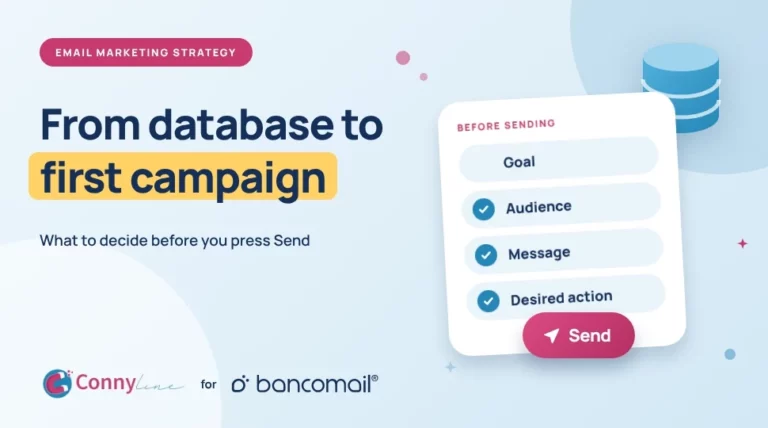
1. Define the sales objective
Before selecting the database, the objective must be clear:
- testing a new region;
- activating a local sales network;
- promoting a service in a specific country;
- reaching an industry in a specific county or state;
- comparing several markets, such as the UK and the US;
- building a campaign for a territorial event.
2. Build the segment in Bancomail
The geographic criterion is combined with the B2B criterion:
- industry + region;
- category + city;
- business activity + postcode or ZIP code;
- country + language;
- vertical + sales area;
- market + company characteristics.
This phase turns an abstract target into an operational selection. When the sector is a key filter, B2B email databases by industry help connect business category with territorial strategy.
3. Import the segment into MailSenpai
Once the database has been defined, the segment can be imported into MailSenpai.
It is useful to keep a clear structure from the beginning by using separate lists, geographic tags, consistent campaign names and fields that support segmentation and analysis.
4. Create territorial tags and groups
Geographic tags help manage sends, automations and reports.
Examples:
- UK_London;
- UK_Manchester;
- US_California;
- US_Texas;
- US_NewYork;
- UK_NorthWest;
- US_WestCoast;
- Priority_Market.
5. Launch a pilot campaign
The pilot campaign measures market interest, message relevance, segment quality and differences between areas.
Instead of activating all available contacts immediately, it starts from a controlled cluster and then decides whether to extend the campaign.
6. Automate follow-ups
After the first send, MailSenpai can manage marketing sequences and automations based on opens, clicks, lack of interaction, geographic area or commercial priority.
A prospect in a strategic area can receive a more complete sequence, while a contact in a secondary area can enter a lighter flow.
7. Analyse results by territory
Reading results by area makes it possible to understand where the campaign worked better and decide whether to continue on a territory, change the message, test a new region or build a more precise second segment.
Practical examples of B2B geolocation in email campaigns
B2B software company
A software company wants to promote an ERP or management platform to manufacturing businesses.
Instead of starting with a national campaign, it can create three segments:
- manufacturing companies in the Midlands;
- manufacturing companies in Greater Manchester;
- manufacturing companies in California.
After importing the segments into MailSenpai, it can send a pilot campaign and compare opens, clicks and replies across the three areas. If one market shows stronger interest, it can expand the target or create a dedicated sales follow-up.
Ho.Re.Ca. supplier
A supplier for hotels, restaurants or bars can use B2B geolocation to work only on the counties, states or cities actually served by its logistics network.
In this case, territory is not just a company record field. It is a commercial condition: the campaign is concentrated where the offer can be delivered effectively.
Marketing agency
A marketing agency may want to contact e-commerce companies in cities or regions with high commercial density.
The geolocated database helps identify coherent targets; MailSenpai then allows the agency to test different messages by area, for example comparing e-commerce businesses in London, Manchester, New York and California.
Company with a local sales network
A company with agents, dealers or partners across territories can create campaigns coordinated with its sales network.
Each area receives coherent communication, and the most relevant leads can be assigned to the local contact person. In this case, the database also helps organise the commercial work that follows the send.
B2B geolocation and personalisation: what to avoid
Using geolocation does not mean making every email artificially local.
The first mistake is using the city name as the only personalisation element. A subject line such as “A solution for companies in London” works only if the rest of the message is consistent.
The second mistake is creating too many micro-segments without a strategy. Splitting the database into many areas makes sense only if there is a plan to manage, analyse and follow them.
The third mistake is confusing localisation with relevance. A message can be geographically correct but commercially weak. Territory helps, but it must be combined with sector, need, offer and timing.
Finally, geolocation should not be used only before sending. Territorial data must also be part of performance analysis.
Why Bancomail and MailSenpai work well together for this use case
The Bancomail × MailSenpai partnership is especially relevant to B2B geolocation because it connects two complementary layers.
Bancomail helps build company selections based on geographic, industry and business criteria.
MailSenpai helps import those segments, organise them into lists or tags, send campaigns, automate follow-ups and measure results.
The path is linear:
- identify the market;
- select the target;
- organise the segments;
- send the campaign;
- automate follow-ups;
- measure performance;
- expand or correct the strategy.
The value of B2B geolocation lies precisely in this continuity between data and action.
From local campaign to territory-intelligent campaign
When discussing geolocation, the risk is reducing everything to the idea of a “local campaign”.
In B2B, the topic is broader.
A territory-intelligent campaign is not simply a campaign sent to a specific area. It is a campaign built around the role that territory plays in the sales strategy.
A territory can be:
- a market to test;
- an area to cover;
- a zone served by agents;
- a high-density industry cluster;
- a language market;
- a logistics region;
- an area where a campaign validated elsewhere can be replicated.
This perspective makes B2B geolocation more useful than a simple geographic filter: territory becomes a decision-making variable.
Conclusion
B2B geolocation is a practical lever for making email campaigns more aligned with the real market.
It is not only used to select companies in a given area. It helps build segments, define priorities, organise follow-ups and interpret results with greater precision.
Starting from Bancomail geolocated B2B databases, companies can identify coherent targets by country, region, county, state, city, postcode or ZIP code. With MailSenpai, those same segments can become lists, tags, automated sequences and measurable campaigns, managed according to B2B permission marketing rules.
The point is not to send “local emails”. The point is to use territory as a strategic signal.
When “where” is connected to “who”, “why” and “how to contact them”, B2B geolocation stops being a filter and becomes a commercial activation lever. Bancomail customers can also access the dedicated MailSenpai benefit for email marketing campaigns, designed to connect verified B2B data with a campaign platform ready for activation.

Francesca Grillo
With a hybrid background in visual design, marketing, and product management, Francesca works at Bancomail as Project Manager and Product Owner, leading digital development and lead generation strategies. For over 15 years, she has operated in both B2B and B2C contexts, focusing on email marketing, process optimization, and customer experience. She is part of Bancomail’s internal B2B Marketing Board and actively contributes to the growth of the company’s ecosystem, with a sharp focus on data value and communication quality. Passionate about writing and nonprofit digital projects, she believes in blending technical vision with narrative sensitivity.